

“Discover” is the view where all of the records in your instance and the associated data fields are gathered and can be viewed and filtered accordingly.
Highlighted are key features you will want to use. Please see the descriptions below the image for more information on each item.
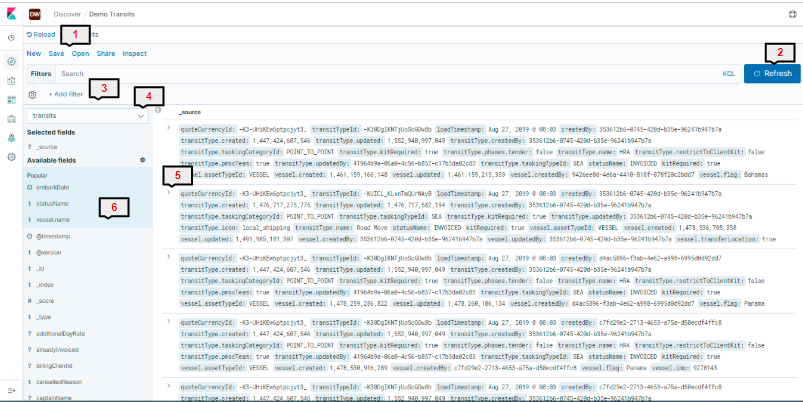
1) New/Save/Open/Share/Inspect
New - Open new data set
Save - Save a specific filtered and arranged data set to be used again later or used in a specific visualisation
Open - Open previously saved data sets
Share - Share a link to your data set or create a CSV export of the data
Inspect - See data requests made against the selected data
2) Refresh
Refresh your current view of the data.
3) Add Filter
Add filters to reduce the amount of data displayed.. See our "Filters" article for further information on filters.
4) Index Select
Select which index you want to work from. See our "Index" article for further information on filters.
5) Expand Record
Expand an individual record to see all of the data fields that are visible against the record.
6) Field Select
View only the fields you want to see in the main view by selecting the specific fields you wish to see